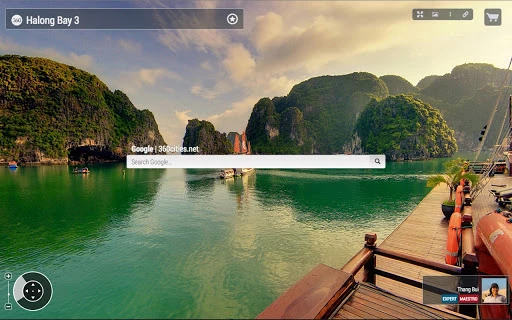

Interactive 360-Degree Photos for Every New Tab
Overview
The 360Cities tab extension transforms your Chrome browser experience by displaying interactive, geo-referenced panoramic photos on every new tab. Designed for users who appreciate immersive visual content, it brings stunning 360-degree views directly to your desktop workflow. The extension leverages a global network of professional photographers to deliver high-quality panoramic imagery, offering users a dynamic and visually engaging browsing environment.
It serves as a digital gallery that enhances daily browsing with rotating panoramic scenes, making routine tasks more enjoyable. Ideal for creatives, photographers, travel enthusiasts, and anyone seeking visual inspiration, the tool turns the browser’s new tab page into a curated showcase of global landscapes, architectural wonders, and cultural landmarks. The integration with 360cities.net allows users to explore the origin of each image, view photographer profiles, and access licensing options for editorial or commercial use.
The developer, 360Cities, is known for hosting one of the web’s most extensive collections of panoramic photography. While specific technical details about the extension’s development process were not provided, its seamless integration with the Chrome browser suggests a focus on usability and visual fidelity. The extension operates entirely within the browser, requiring no additional software installation beyond the standard Chrome add-on process.
Key Features & Capabilities
- Interactive 360-Degree Viewing – Pan 360 degrees horizontally and 180 degrees vertically for a fully spherical experience, allowing users to explore panoramic scenes from any angle.
- Zoom and Detail Exploration – Zoom in and out to examine fine details in high-resolution images, enhancing the realism and immersion of the visual experience.
- Full-Screen Mode – Toggle into full-screen view for an uninterrupted, immersive panorama experience, ideal for visual relaxation or inspiration.
- Projection and Navigation Options – Choose from six different image projections and two navigation modes to customize how the panorama is displayed and interacted with.
- Photographer and Licensing Integration – Click to view the profile of the contributing photographer on 360cities.net, and access licensing information via a shopping cart icon for non-commercial or commercial use.
- Social Sharing and Embedding – Share any panorama directly on social media platforms or embed it into personal websites or blogs for non-commercial purposes.
- Search Integration – Use built-in search functionality to find specific panoramas via Google or within the 360Cities platform.
These features collectively create a rich, interactive experience that turns a simple new tab into a gateway to global visual storytelling. Users can seamlessly transition from casual viewing to deeper exploration, whether researching travel destinations, seeking creative inspiration, or learning about photographic techniques.
User Interface, Workflow & Performance
The user interface of the 360Cities tab extension is minimal and intuitive, aligning with Chrome’s standard new tab design. The panoramic image occupies the full viewport, with subtle navigation controls accessible through mouse and touch gestures. Interaction is responsive, allowing smooth panning and zooming without noticeable lag.
Workflow efficiency is high, as the extension activates automatically on every new tab without requiring user intervention. The interface remains unobtrusive, ensuring that browsing tasks are not disrupted. Navigation is consistent across all images, with clear visual cues for panning and zooming.
Performance details were not specified by the developer. However, given the extension’s size of 2.1 MB and its reliance on browser rendering, it is expected to operate efficiently on modern systems. Resource usage, including CPU and RAM behavior, was not disclosed. The extension does not appear to require background processes, suggesting low overhead during idle periods.
Compatibility & System Requirements
The 360Cities tab extension is compatible with Windows and Mac operating systems, supporting the latest versions of the Chrome browser. The installation size is 2.1 MB, which is compact and suitable for most users.
Exact system requirements were not listed. Compatibility information was partially provided, indicating that the extension functions within the Chrome ecosystem. No additional hardware specifications were mentioned. The developer did not provide details about required processor speed, memory, or graphics capabilities.
Pros and Cons
Pros
- Brings immersive 360-degree panoramic views to every new browser tab
- High-quality, geo-referenced imagery from a global network of photographers
- Intuitive interface with smooth panning and zooming capabilities
- Offers full-screen mode and multiple projection options for enhanced customization
- Enables access to photographer profiles and licensing details
- Free to use with no ads or in-app purchases
Cons
- No information on system resource usage or performance impact
- Limited to Chrome browser; not available on other platforms
- Requires internet connection for image loading and functionality
- Only supports non-commercial embedding and social sharing
FAQ Section
Is the 360Cities tab extension available for browsers other than Chrome?
The extension is currently designed for Chrome. No information was provided about compatibility with other browsers such as Firefox, Edge, or Safari.
Is the extension safe to install and use?
As a Chrome extension distributed through the official Chrome Web Store, it is subject to Google’s security review process. The developer, 360Cities, is a recognized platform for panoramic photography, adding credibility to the extension’s legitimacy.
How often are new panoramas updated on the extension?
Updates depend on the content upload schedule of 360cities.net. The extension automatically pulls new images from the platform, but the frequency of updates is not specified.
Can I use the panoramas for commercial projects?
Yes, users can license images for commercial or editorial use through the shopping cart icon within the extension. The licensing terms are managed via the 360cities.net platform.
Does the extension work offline?
No, the extension requires an active internet connection to load and display panoramic images from the 360cities.net server.
Final Thoughts
The 360Cities tab extension offers a unique and visually captivating enhancement to the Chrome browsing experience. By transforming the new tab page into an interactive gallery of global panoramas, it combines aesthetic appeal with functional utility. Its seamless integration, intuitive controls, and access to professional-grade imagery make it a standout choice for users seeking inspiration, relaxation, or creative input.
While performance metrics and system requirements were not disclosed, the extension’s lightweight design and browser-based operation suggest minimal impact on system resources. The free model, combined with full access to licensing options, adds significant value. It is particularly beneficial for photographers, educators, travel bloggers, and digital artists who value immersive visual content.
For anyone looking to elevate their daily browsing with stunning, interactive visuals, this tool delivers on its promise. Download 360Cities tab extension now.







